
ChatGPT Hot
Independent third-party subscription service.
This service is provided independently by EASELYGO and is not the official website of any brand.
- Membership subscription
- Instant delivery
- Safe & reliable
- 24/7 support
Product Details
ChatGPT Plus Account | 30-Day Full Warranty
Experience the powerful features of ChatGPT Plus for AI conversations, content creation, coding, translation, learning, and productivity.
This version includes full usage support. If account issues occur during the validity period, customer service will assist you.
Features
Access to ChatGPT Plus advanced models
Suitable for writing, coding, translation, and analysis
Ready to use after purchase
30-day usage period with full support
How To Use
Receive ChatGPT account details after purchase
Log in and start using ChatGPT Plus features
You can update password, email, and security settings if needed
Notes
Avoid frequent IP switching or unusual login environments
Avoid logging in from multiple locations within a short time
Normal usage helps maintain account stability
Contact customer support if any account issues occur
【How to Use】
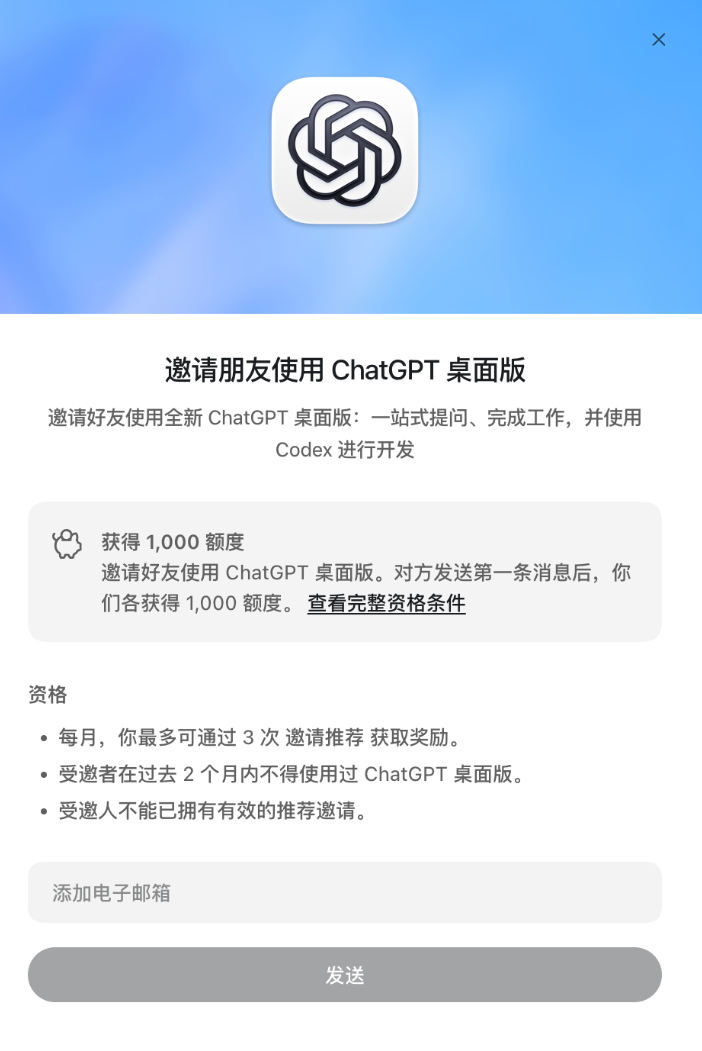
Go to Codex → Settings → Invite Friends and check whether a credit reward is displayed. If no reward is shown, the account may not be eligible or may have already sent 3 invitations (unaccepted invitations also count).
Open https://reset.tofly.app, enter the redemption code, and redeem an email address.
In Codex → Settings → Invite Friends, enter the redeemed email address and send the invitation.
Return to the email redemption page and click “Confirm Invitation Sent” for the corresponding email address.
【Important】
Make sure the invitation page clearly shows a credit reward. Normally, the reward is 250–1,000 credits. If no specific reward amount is displayed, do not place an order.
The reward amount is based on the credits shown when you send the invitation. We guarantee acceptance of the invitation, but do not guarantee that the reward credits will be credited. You can check the reward under Settings → Usage & Billing → Credit Balance.
If the website cannot be opened or an error occurs when entering the invitation email, it is usually a network issue. Switch to another network node and try again.
The redemption code must be used within 1 hour. No refund or replacement will be provided after expiration. No refunds after redemption.
What is this product?
This is a ChatGPT Plus related service. Official website: https://chatgpt.com/
which ChatGPT member stalls does ezsub offer?
We offer members ChatGPT a variety of stalls, with a variety of duration for you to choose from.
What is the difference between an account class and a surrogate class?
The account type directly delivers the login information of the ChatGPT account. The replacement class may require you to provide the replacement authorization code, and ezsub will open the official ChatGPT Plus member for the account.
Which stalls do not provide after-sales?
Only the stalls clearly marked "no warranty/no guarantee" do not provide account survival time and membership time after-sales.
What does the background field "api code" mean?
The background field "api code" should be understood as the replacement authorization code. Please log in to your ChatGPT account before opening the https://chatgpt.com/api/auth/session,并按照下单表单提示复制所需代码 。. This code is not an OpenAI API key and does not contain an OpenAI API usage quota.
Will the Plus benefits, device usage and account rules remain the same?
This member is used for official ChatGPT Plus. The specific function rights, available scope, equipment use and account rules are subject to OpenAI's current official policies and the actual status of the account.
What if you encounter problems in use?
It shall be handled according to the unified after-sales rules of ezsub. Non-warranty stalls shall be handled according to the whole-process warranty rules. In case of differences in account status or available range of functions, the current official policy of OpenAI and the actual status of the account shall prevail.
What is this product?
This is a ChatGPT Plus related service. Official website: https://chatgpt.com/
which ChatGPT member stalls does ezsub offer?
We offer members ChatGPT a variety of stalls, with a variety of duration for you to choose from.
What is the difference between an account class and a surrogate class?
The account type directly delivers the login information of the ChatGPT account. The replacement class may require you to provide the replacement authorization code, and ezsub will open the official ChatGPT Plus member for the account.
Which stalls do not provide after-sales?
Only the stalls clearly marked "no warranty/no guarantee" do not provide account survival time and membership time after-sales.
What does the background field "api code" mean?
The background field "api code" should be understood as the replacement authorization code. Please log in to your ChatGPT account before opening the https://chatgpt.com/api/auth/session,并按照下单表单提示复制所需代码 。. This code is not an OpenAI API key and does not contain an OpenAI API usage quota.
Will the Plus benefits, device usage and account rules remain the same?
This member is used for official ChatGPT Plus. The specific function rights, available scope, equipment use and account rules are subject to OpenAI's current official policies and the actual status of the account.
What if you encounter problems in use?
It shall be handled according to the unified after-sales rules of ezsub. Non-warranty stalls shall be handled according to the whole-process warranty rules. In case of differences in account status or available range of functions, the current official policy of OpenAI and the actual status of the account shall prevail.
What is this product?
This is a ChatGPT Plus related service. Official website: https://chatgpt.com/
which ChatGPT member stalls does ezsub offer?
We offer members ChatGPT a variety of stalls, with a variety of duration for you to choose from.
What is the difference between an account class and a surrogate class?
The account type directly delivers the login information of the ChatGPT account. The replacement class may require you to provide the replacement authorization code, and ezsub will open the official ChatGPT Plus member for the account.
Which stalls do not provide after-sales?
Only the stalls clearly marked "no warranty/no guarantee" do not provide account survival time and membership time after-sales.
What does the background field "api code" mean?
The background field "api code" should be understood as the replacement authorization code. Please log in to your ChatGPT account before opening the https://chatgpt.com/api/auth/session,并按照下单表单提示复制所需代码 。. This code is not an OpenAI API key and does not contain an OpenAI API usage quota.
Will the Plus benefits, device usage and account rules remain the same?
This member is used for official ChatGPT Plus. The specific function rights, available scope, equipment use and account rules are subject to OpenAI's current official policies and the actual status of the account.
What if you encounter problems in use?
It shall be handled according to the unified after-sales rules of ezsub. Non-warranty stalls shall be handled according to the whole-process warranty rules. In case of differences in account status or available range of functions, the current official policy of OpenAI and the actual status of the account shall prevail.
Before You Buy
- This product adds Codex Credits to a ChatGPT account with an active Plus or Pro subscription.
- A top-up adds usage credits. It does not activate or renew a Plus or Pro subscription, and it is not an OpenAI API balance top-up.
- Before ordering, make sure your account can use Codex and that its usage page shows an option to purchase or add credits.
- Once we receive your order and valid top-up code, we will complete the top-up as soon as possible. Completed top-ups cannot be refunded, moved to another account, or transferred. For missing credits or top-up errors, contact EZSUB support.
Add Credits and Keep Your Coding Tasks Moving
When your included Codex allowance runs out, add Credits to your existing account to continue writing code, troubleshooting issues, and making project changes without upgrading your subscription just to get more usage.
Keep using your account: Credits are added to the account associated with the code you submit.
Top up as needed: Choose the credit amount and price shown in the product options.
No password required:Submit your top-up code through the designated field in your EZSUB order. See the FAQ below for instructions.
Credits are consumed based on actual usage, not a fixed number of messages or hours. Consumption varies with the model, task complexity, context length, usage mode, and other factors.
Before You Buy
- This product adds Codex Credits to a ChatGPT account with an active Plus or Pro subscription.
- A top-up adds usage credits. It does not activate or renew a Plus or Pro subscription, and it is not an OpenAI API balance top-up.
- Before ordering, make sure your account can use Codex and that its usage page shows an option to purchase or add credits.
- Once we receive your order and valid top-up code, we will complete the top-up as soon as possible. Completed top-ups cannot be refunded, moved to another account, or transferred. For missing credits or top-up errors, contact EZSUB support.
Add Credits and Keep Your Coding Tasks Moving
When your included Codex allowance runs out, add Credits to your existing account to continue writing code, troubleshooting issues, and making project changes without upgrading your subscription just to get more usage.
Keep using your account: Credits are added to the account associated with the code you submit.
Top up as needed: Choose the credit amount and price shown in the product options.
No password required:Submit your top-up code through the designated field in your EZSUB order. See the FAQ below for instructions.
Credits are consumed based on actual usage, not a fixed number of messages or hours. Consumption varies with the model, task complexity, context length, usage mode, and other factors.
Before You Buy
- This product adds Codex Credits to a ChatGPT account with an active Plus or Pro subscription.
- A top-up adds usage credits. It does not activate or renew a Plus or Pro subscription, and it is not an OpenAI API balance top-up.
- Before ordering, make sure your account can use Codex and that its usage page shows an option to purchase or add credits.
- Once we receive your order and valid top-up code, we will complete the top-up as soon as possible. Completed top-ups cannot be refunded, moved to another account, or transferred. For missing credits or top-up errors, contact EZSUB support.
Add Credits and Keep Your Coding Tasks Moving
When your included Codex allowance runs out, add Credits to your existing account to continue writing code, troubleshooting issues, and making project changes without upgrading your subscription just to get more usage.
Keep using your account: Credits are added to the account associated with the code you submit.
Top up as needed: Choose the credit amount and price shown in the product options.
No password required:Submit your top-up code through the designated field in your EZSUB order. See the FAQ below for instructions.
Credits are consumed based on actual usage, not a fixed number of messages or hours. Consumption varies with the model, task complexity, context length, usage mode, and other factors.
Before You Buy
- This product adds Codex Credits to a ChatGPT account with an active Plus or Pro subscription.
- A top-up adds usage credits. It does not activate or renew a Plus or Pro subscription, and it is not an OpenAI API balance top-up.
- Before ordering, make sure your account can use Codex and that its usage page shows an option to purchase or add credits.
- Once we receive your order and valid top-up code, we will complete the top-up as soon as possible. Completed top-ups cannot be refunded, moved to another account, or transferred. For missing credits or top-up errors, contact EZSUB support.
Add Credits and Keep Your Coding Tasks Moving
When your included Codex allowance runs out, add Credits to your existing account to continue writing code, troubleshooting issues, and making project changes without upgrading your subscription just to get more usage.
Keep using your account: Credits are added to the account associated with the code you submit.
Top up as needed: Choose the credit amount and price shown in the product options.
No password required:Submit your top-up code through the designated field in your EZSUB order. See the FAQ below for instructions.
Credits are consumed based on actual usage, not a fixed number of messages or hours. Consumption varies with the model, task complexity, context length, usage mode, and other factors.
Product Details
ChatGPT Self-Service Top-up Guide
Before you start: Please use a computer and log in to the ChatGPT account you want to top up. The account must not have an active subscription.
Step 1: Open the top-up page
After purchase, go to the self-service top-up page and click [Copy Code].

Step 2: Copy the account code
You will be redirected to the code page.
Do not enable browser translation. Copy all the code exactly as displayed without omitting or changing anything.

Step 3: Verify the account
Return to the top-up page, paste the code into the text box, and click [Verify Account Information].

Step 4: Confirm the top-up
Check the displayed account and subscription plan. If the information is correct, click [Confirm Top-up] to submit.
Please verify the account carefully. The account cannot be changed after submission.
Product Introduction
ChatGPT Self-Service Top-up allows you to activate a subscription on your own account.
You do not need to provide your account, password, or 2FA information. Paste the top-up code, verify the displayed account information, and submit your order.
After the top-up is completed, you can continue using your original account. Your chat history and account settings will not be affected.
Service Features
No password required
Only the top-up code is required, reducing the risk of exposing account information.
Account verification
You can check the account linked to the code before submitting.
Fully self-service
Follow the instructions on the page without waiting for customer support.
Multiple subscription plans
ChatGPT Plus, Pro 5X, and Pro 20X plans are available.
Subscription Plans
ChatGPT Plus
Suitable for daily work, study, writing, translation, image generation, and coding assistance.
ChatGPT Pro 5X
Suitable for frequent users, content creators, programmers, and professionals.
ChatGPT Pro 20X
Suitable for intensive, long-term use and users who require higher usage limits.
Available models, features, and usage limits are subject to the official ChatGPT service and the information displayed in your account.
Before Top-up
Obtain the code from the ChatGPT account you want to top up.
Check the displayed account information carefully.
The account cannot be changed after submission.
Do not submit the same order repeatedly or share the code with others.
Accounts with restrictions, risk controls, or subscription conflicts may not be eligible.
ChatGPT subscriptions do not include OpenAI API credit.
Delivery and After-sales Support
The system will process the top-up automatically after submission. Please check the order page for the latest status.
If the code cannot be verified, the top-up fails, or the subscription is not delivered for an extended period, contact customer support with your order number and screenshots.
Incorrect account submission, account restrictions, official feature changes, or exhausted usage limits are not covered by after-sales support.
Product Details
ChatGPT Self-Service Top-up Guide
Before you start: Please use a computer and log in to the ChatGPT account you want to top up. The account must not have an active subscription.
Step 1: Open the top-up page
After purchase, go to the self-service top-up page and click [Copy Code].
Step 2: Copy the account code
You will be redirected to the code page.
Do not enable browser translation. Copy all the code exactly as displayed without omitting or changing anything.
Step 3: Verify the account
Return to the top-up page, paste the code into the text box, and click [Verify Account Information].
Step 4: Confirm the top-up
Check the displayed account and subscription plan. If the information is correct, click [Confirm Top-up] to submit.
Please verify the account carefully. The account cannot be changed after submission.
Product Introduction
ChatGPT Self-Service Top-up allows you to activate a subscription on your own account.
You do not need to provide your account, password, or 2FA information. Paste the top-up code, verify the displayed account information, and submit your order.
After the top-up is completed, you can continue using your original account. Your chat history and account settings will not be affected.
Service Features
No password required
Only the top-up code is required, reducing the risk of exposing account information.
Account verification
You can check the account linked to the code before submitting.
Fully self-service
Follow the instructions on the page without waiting for customer support.
Multiple subscription plans
ChatGPT Plus, Pro 5X, and Pro 20X plans are available.
Subscription Plans
ChatGPT Plus
Suitable for daily work, study, writing, translation, image generation, and coding assistance.
ChatGPT Pro 5X
Suitable for frequent users, content creators, programmers, and professionals.
ChatGPT Pro 20X
Suitable for intensive, long-term use and users who require higher usage limits.
Available models, features, and usage limits are subject to the official ChatGPT service and the information displayed in your account.
Before Top-up
Obtain the code from the ChatGPT account you want to top up.
Check the displayed account information carefully.
The account cannot be changed after submission.
Do not submit the same order repeatedly or share the code with others.
Accounts with restrictions, risk controls, or subscription conflicts may not be eligible.
ChatGPT subscriptions do not include OpenAI API credit.
Delivery and After-sales Support
The system will process the top-up automatically after submission. Please check the order page for the latest status.
If the code cannot be verified, the top-up fails, or the subscription is not delivered for an extended period, contact customer support with your order number and screenshots.
Incorrect account submission, account restrictions, official feature changes, or exhausted usage limits are not covered by after-sales support.
FAQ
What is this product?
This is a ChatGPT Plus related service. Official website: https://chatgpt.com/
What ChatGPT membership tiers are available?
We offer multiple ChatGPT membership tiers with various durations for you to choose from.
What is the difference between account type and recharge-on-behalf type?
Account type delivers the login credentials of the ChatGPT account directly. Recharge-on-behalf type requires you to provide an authorization code; we will activate the official ChatGPT Plus subscription for your account.
Which tiers do not include after-sales support?
Only tiers explicitly marked "No Warranty" do not include after-sales service for account validity and subscription duration.
What does the backend field "api code" mean?
The backend field "api code" refers to the authorization code for recharge. Please log in to your own ChatGPT account first, open https://chatgpt.com/api/auth/session and copy the required code following the instructions in the order form. This code is not the OpenAI API Key and does not include OpenAI API usage quota.
Will Plus benefits, device usage and account rules remain unchanged forever?
This subscription is for official ChatGPT Plus usage. The specific benefits, usable scope, device limits and account rules are subject to OpenAI’s current official policy and the actual status of your account.
What should I do if I encounter problems during use?
Issues will be handled in accordance with the unified after-sales policy. Tiers without "No Warranty" marking are covered by full warranty. Any discrepancy in account status or available features is subject to OpenAI’s current official policy and the actual account status.
What is this product?
This is a ChatGPT Plus related service. Official website: https://chatgpt.com/
What ChatGPT membership tiers are available?
We offer multiple ChatGPT membership tiers with various durations for you to choose from.
What is the difference between account type and recharge-on-behalf type?
Account type delivers the login credentials of the ChatGPT account directly. Recharge-on-behalf type requires you to provide an authorization code; we will activate the official ChatGPT Plus subscription for your account.
Which tiers do not include after-sales support?
Only tiers explicitly marked "No Warranty" do not include after-sales service for account validity and subscription duration.
What does the backend field "api code" mean?
The backend field "api code" refers to the authorization code for recharge. Please log in to your own ChatGPT account first, open https://chatgpt.com/api/auth/session and copy the required code following the instructions in the order form. This code is not the OpenAI API Key and does not include OpenAI API usage quota.
Will Plus benefits, device usage and account rules remain unchanged forever?
This subscription is for official ChatGPT Plus usage. The specific benefits, usable scope, device limits and account rules are subject to OpenAI’s current official policy and the actual status of your account.
What should I do if I encounter problems during use?
Issues will be handled in accordance with the unified after-sales policy. Tiers without "No Warranty" marking are covered by full warranty. Any discrepancy in account status or available features is subject to OpenAI’s current official policy and the actual account status.
What is this product?
This is a ChatGPT Plus related service. Official website: https://chatgpt.com/
What ChatGPT membership tiers are available?
We offer multiple ChatGPT membership tiers with various durations for you to choose from.
What is the difference between account type and recharge-on-behalf type?
Account type delivers the login credentials of the ChatGPT account directly. Recharge-on-behalf type requires you to provide an authorization code; we will activate the official ChatGPT Plus subscription for your account.
Which tiers do not include after-sales support?
Only tiers explicitly marked "No Warranty" do not include after-sales service for account validity and subscription duration.
What does the backend field "api code" mean?
The backend field "api code" refers to the authorization code for recharge. Please log in to your own ChatGPT account first, open https://chatgpt.com/api/auth/session and copy the required code following the instructions in the order form. This code is not the OpenAI API Key and does not include OpenAI API usage quota.
Will Plus benefits, device usage and account rules remain unchanged forever?
This subscription is for official ChatGPT Plus usage. The specific benefits, usable scope, device limits and account rules are subject to OpenAI’s current official policy and the actual status of your account.
What should I do if I encounter problems during use?
Issues will be handled in accordance with the unified after-sales policy. Tiers without "No Warranty" marking are covered by full warranty. Any discrepancy in account status or available features is subject to OpenAI’s current official policy and the actual account status.
What is this product?
This is a ChatGPT Plus related service. Official website: https://chatgpt.com/
What ChatGPT membership tiers are available?
We offer multiple ChatGPT membership tiers with various durations for you to choose from.
What is the difference between account type and recharge-on-behalf type?
Account type delivers the login credentials of the ChatGPT account directly. Recharge-on-behalf type requires you to provide an authorization code; we will activate the official ChatGPT Plus subscription for your account.
Which tiers do not include after-sales support?
Only tiers explicitly marked "No Warranty" do not include after-sales service for account validity and subscription duration.
What does the backend field "api code" mean?
The backend field "api code" refers to the authorization code for recharge. Please log in to your own ChatGPT account first, open https://chatgpt.com/api/auth/session and copy the required code following the instructions in the order form. This code is not the OpenAI API Key and does not include OpenAI API usage quota.
Will Plus benefits, device usage and account rules remain unchanged forever?
This subscription is for official ChatGPT Plus usage. The specific benefits, usable scope, device limits and account rules are subject to OpenAI’s current official policy and the actual status of your account.
What should I do if I encounter problems during use?
Issues will be handled in accordance with the unified after-sales policy. Tiers without "No Warranty" marking are covered by full warranty. Any discrepancy in account status or available features is subject to OpenAI’s current official policy and the actual account status.
What is this product?
This is a ChatGPT Plus related service. Official website: https://chatgpt.com/
What ChatGPT membership tiers are available?
We offer multiple ChatGPT membership tiers with various durations for you to choose from.
What is the difference between account type and recharge-on-behalf type?
Account type delivers the login credentials of the ChatGPT account directly. Recharge-on-behalf type requires you to provide an authorization code; we will activate the official ChatGPT Plus subscription for your account.
Which tiers do not include after-sales support?
Only tiers explicitly marked "No Warranty" do not include after-sales service for account validity and subscription duration.
What does the backend field "api code" mean?
The backend field "api code" refers to the authorization code for recharge. Please log in to your own ChatGPT account first, open https://chatgpt.com/api/auth/session and copy the required code following the instructions in the order form. This code is not the OpenAI API Key and does not include OpenAI API usage quota.
Will Plus benefits, device usage and account rules remain unchanged forever?
This subscription is for official ChatGPT Plus usage. The specific benefits, usable scope, device limits and account rules are subject to OpenAI’s current official policy and the actual status of your account.
What should I do if I encounter problems during use?
Issues will be handled in accordance with the unified after-sales policy. Tiers without "No Warranty" marking are covered by full warranty. Any discrepancy in account status or available features is subject to OpenAI’s current official policy and the actual account status.
What is this product?
This is a ChatGPT Plus related service. Official website: https://chatgpt.com/
What ChatGPT membership tiers are available?
We offer multiple ChatGPT membership tiers with various durations for you to choose from.
What is the difference between account type and recharge-on-behalf type?
Account type delivers the login credentials of the ChatGPT account directly. Recharge-on-behalf type requires you to provide an authorization code; we will activate the official ChatGPT Plus subscription for your account.
Which tiers do not include after-sales support?
Only tiers explicitly marked "No Warranty" do not include after-sales service for account validity and subscription duration.
What does the backend field "api code" mean?
The backend field "api code" refers to the authorization code for recharge. Please log in to your own ChatGPT account first, open https://chatgpt.com/api/auth/session and copy the required code following the instructions in the order form. This code is not the OpenAI API Key and does not include OpenAI API usage quota.
Will Plus benefits, device usage and account rules remain unchanged forever?
This subscription is for official ChatGPT Plus usage. The specific benefits, usable scope, device limits and account rules are subject to OpenAI’s current official policy and the actual status of your account.
What should I do if I encounter problems during use?
Issues will be handled in accordance with the unified after-sales policy. Tiers without "No Warranty" marking are covered by full warranty. Any discrepancy in account status or available features is subject to OpenAI’s current official policy and the actual account status.
What is this product?
This is a ChatGPT Plus related service. Official website: https://chatgpt.com/
What ChatGPT membership tiers are available?
We offer multiple ChatGPT membership tiers with various durations for you to choose from.
What is the difference between account type and recharge-on-behalf type?
Account type delivers the login credentials of the ChatGPT account directly. Recharge-on-behalf type requires you to provide an authorization code; we will activate the official ChatGPT Plus subscription for your account.
Which tiers do not include after-sales support?
Only tiers explicitly marked "No Warranty" do not include after-sales service for account validity and subscription duration.
What does the backend field "api code" mean?
The backend field "api code" refers to the authorization code for recharge. Please log in to your own ChatGPT account first, open https://chatgpt.com/api/auth/session and copy the required code following the instructions in the order form. This code is not the OpenAI API Key and does not include OpenAI API usage quota.
Will Plus benefits, device usage and account rules remain unchanged forever?
This subscription is for official ChatGPT Plus usage. The specific benefits, usable scope, device limits and account rules are subject to OpenAI’s current official policy and the actual status of your account.
What should I do if I encounter problems during use?
Issues will be handled in accordance with the unified after-sales policy. Tiers without "No Warranty" marking are covered by full warranty. Any discrepancy in account status or available features is subject to OpenAI’s current official policy and the actual account status.
What is this product?
This is a ChatGPT Plus related service. Official website: https://chatgpt.com/
What ChatGPT membership tiers are available?
We offer multiple ChatGPT membership tiers with various durations for you to choose from.
What is the difference between account type and recharge-on-behalf type?
Account type delivers the login credentials of the ChatGPT account directly. Recharge-on-behalf type requires you to provide an authorization code; we will activate the official ChatGPT Plus subscription for your account.
Which tiers do not include after-sales support?
Only tiers explicitly marked "No Warranty" do not include after-sales service for account validity and subscription duration.
What does the backend field "api code" mean?
The backend field "api code" refers to the authorization code for recharge. Please log in to your own ChatGPT account first, open https://chatgpt.com/api/auth/session and copy the required code following the instructions in the order form. This code is not the OpenAI API Key and does not include OpenAI API usage quota.
Will Plus benefits, device usage and account rules remain unchanged forever?
This subscription is for official ChatGPT Plus usage. The specific benefits, usable scope, device limits and account rules are subject to OpenAI’s current official policy and the actual status of your account.
What should I do if I encounter problems during use?
Issues will be handled in accordance with the unified after-sales policy. Tiers without "No Warranty" marking are covered by full warranty. Any discrepancy in account status or available features is subject to OpenAI’s current official policy and the actual account status.
What is this product?
This is a ChatGPT Plus related service. Official website: https://chatgpt.com/
What ChatGPT membership tiers are available?
We offer multiple ChatGPT membership tiers with various durations for you to choose from.
What is the difference between account type and recharge-on-behalf type?
Account type delivers the login credentials of the ChatGPT account directly. Recharge-on-behalf type requires you to provide an authorization code; we will activate the official ChatGPT Plus subscription for your account.
Which tiers do not include after-sales support?
Only tiers explicitly marked "No Warranty" do not include after-sales service for account validity and subscription duration.
What does the backend field "api code" mean?
The backend field "api code" refers to the authorization code for recharge. Please log in to your own ChatGPT account first, open https://chatgpt.com/api/auth/session and copy the required code following the instructions in the order form. This code is not the OpenAI API Key and does not include OpenAI API usage quota.
Will Plus benefits, device usage and account rules remain unchanged forever?
This subscription is for official ChatGPT Plus usage. The specific benefits, usable scope, device limits and account rules are subject to OpenAI’s current official policy and the actual status of your account.
What should I do if I encounter problems during use?
Issues will be handled in accordance with the unified after-sales policy. Tiers without "No Warranty" marking are covered by full warranty. Any discrepancy in account status or available features is subject to OpenAI’s current official policy and the actual account status.
What is this product?
This is a ChatGPT Plus related service. Official website: https://chatgpt.com/
What ChatGPT membership tiers are available?
We offer multiple ChatGPT membership tiers with various durations for you to choose from.
What is the difference between account type and recharge-on-behalf type?
Account type delivers the login credentials of the ChatGPT account directly. Recharge-on-behalf type requires you to provide an authorization code; we will activate the official ChatGPT Plus subscription for your account.
Which tiers do not include after-sales support?
Only tiers explicitly marked "No Warranty" do not include after-sales service for account validity and subscription duration.
What does the backend field "api code" mean?
The backend field "api code" refers to the authorization code for recharge. Please log in to your own ChatGPT account first, open https://chatgpt.com/api/auth/session and copy the required code following the instructions in the order form. This code is not the OpenAI API Key and does not include OpenAI API usage quota.
Will Plus benefits, device usage and account rules remain unchanged forever?
This subscription is for official ChatGPT Plus usage. The specific benefits, usable scope, device limits and account rules are subject to OpenAI’s current official policy and the actual status of your account.
What should I do if I encounter problems during use?
Issues will be handled in accordance with the unified after-sales policy. Tiers without "No Warranty" marking are covered by full warranty. Any discrepancy in account status or available features is subject to OpenAI’s current official policy and the actual account status.
What is this product?
This is a ChatGPT Plus related service. Official website: https://chatgpt.com/
What ChatGPT membership tiers are available?
We offer multiple ChatGPT membership tiers with various durations for you to choose from.
What is the difference between account type and recharge-on-behalf type?
Account type delivers the login credentials of the ChatGPT account directly. Recharge-on-behalf type requires you to provide an authorization code; we will activate the official ChatGPT Plus subscription for your account.
Which tiers do not include after-sales support?
Only tiers explicitly marked "No Warranty" do not include after-sales service for account validity and subscription duration.
What does the backend field "api code" mean?
The backend field "api code" refers to the authorization code for recharge. Please log in to your own ChatGPT account first, open https://chatgpt.com/api/auth/session and copy the required code following the instructions in the order form. This code is not the OpenAI API Key and does not include OpenAI API usage quota.
Will Plus benefits, device usage and account rules remain unchanged forever?
This subscription is for official ChatGPT Plus usage. The specific benefits, usable scope, device limits and account rules are subject to OpenAI’s current official policy and the actual status of your account.
What should I do if I encounter problems during use?
Issues will be handled in accordance with the unified after-sales policy. Tiers without "No Warranty" marking are covered by full warranty. Any discrepancy in account status or available features is subject to OpenAI’s current official policy and the actual account status.